
Some practice items are worth zero points and show 0% (0 points earned out of 0 points available).
This does not change your students' real grades, and you only need to grade the final submission in each course.
As of mid-August 2026, we're working to update all practice lessons so that by default:
-
students do not see a grade for this lesson
- this lesson does not get sent to reports
If you need to hide individual assignments from students and/or your reports
1. Open the gradebook for that assignment
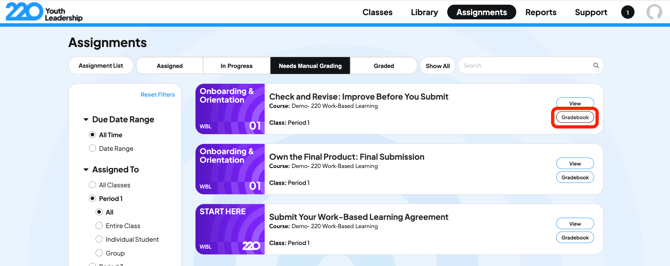
2. Turn off "Grades to Reports" to hide these assignments from your reports.
3. Turn off "Grades to Students" so students don't see a grade associated with that assignment.
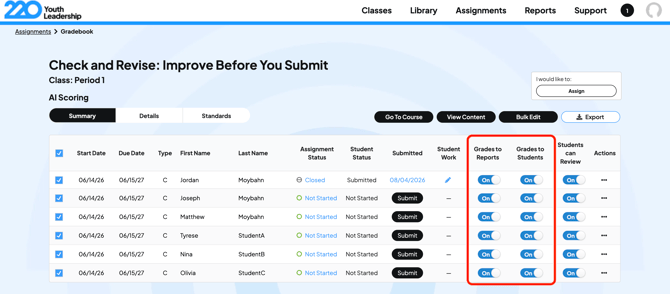
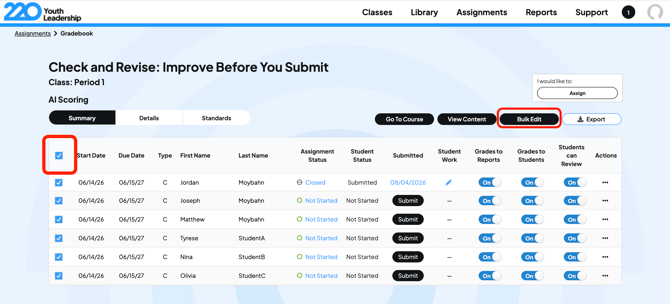
You can do this individually by clicking the toggles in the image above, or in bulk by selecting all students/attempts and then clicking "Bulk Edit".
Their real grade stays the same, because the item is worth zero points.
Another cause of a 0% showing up for a graded assignment is if you clicked in to view student work without assigning a grade.
You must enter a grade once you view the student assignment or it will be recorded as a 0.
You should be able to go back and change the grade.
Quick summary:
- 0% on practice work is a display setting, not a real grade
- Turn off Release to reports and Release grades to students to hide it