
Closed captions on videos
Every video has closed captions available in English and Spanish.
Translate assignment text with C2C Translate
Assignment text can be translated into English, Spanish, or German.
- Open the assignment.
- Look at the toolbar at the top of the assignment.
- Click C2C Translate.
- Choose the language.
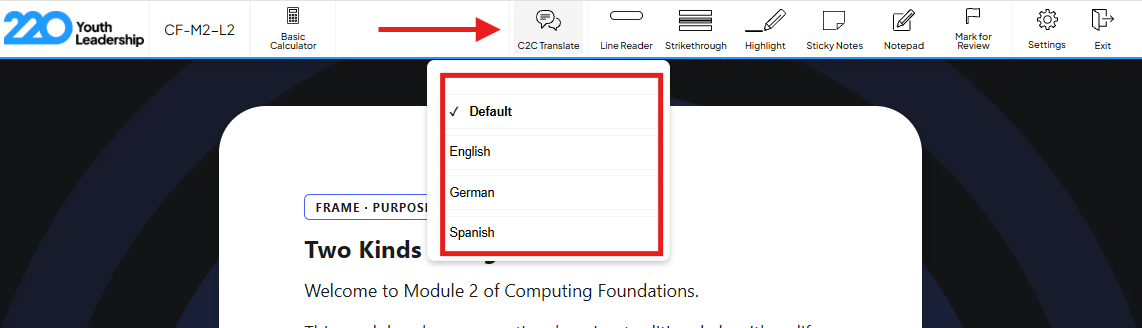
Note: The translate setting does not carry over between assignments. Students need to click C2C Translate and choose their language again each time they open a new assignment.
Need a different language?
If a student needs a language beyond English, Spanish or German, recommend a browser translation tool like Google Translate in Chrome, or another tool they already use. All on-screen text on the platform is in HTML format, so most screen translation tools work.
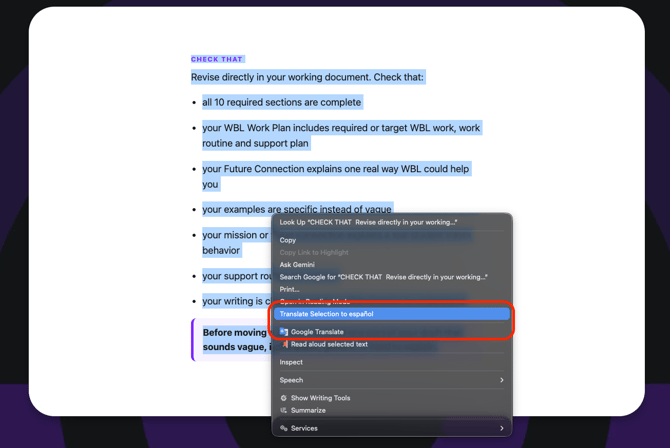
Using Google Translate:
- Select the text on screen the student wants to translate.
- Right-click the selected text.
- Click Translate in the menu.
- Choose the language.
Common questions
Are video captions available in German? No. Captions are available in English and Spanish only. German translation is available for assignment text through C2C Translate.
Do students need to turn on translation every time? Yes. The C2C Translate setting resets on each new assignment. Students need to click it again and choose their language each time.
What if a student needs a language the platform does not support? Use a browser translation tool like Google Translate. Since the platform's text is in HTML format, most screen translation tools should work.