
After your class has its 220 course, students sign up with the class access code.
Steps for students to join
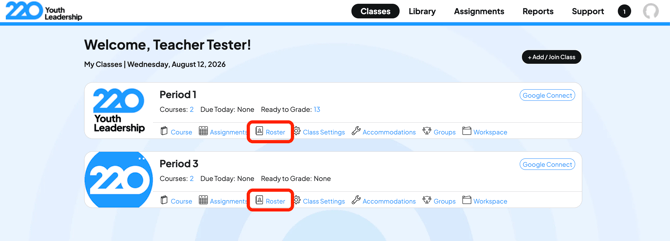
1. From the Classes page, click on "Roster" for the class where you want to enroll students.
2. Find and select the student access or signup code.
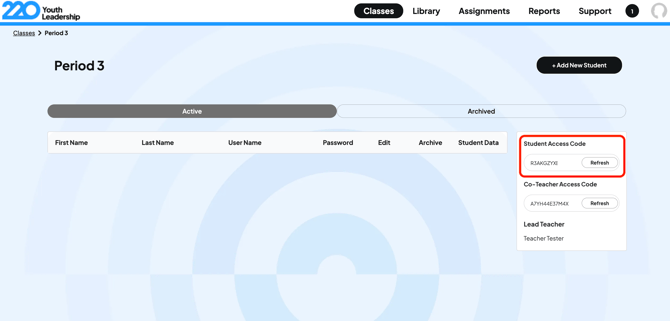
3. Share the code with your students via your preferred communication method along with instructions to login.
Sample message you can send
"Here are the details you need to create your 220 account and access your coursework.
1. Go to https://learn.220leadership.com/.
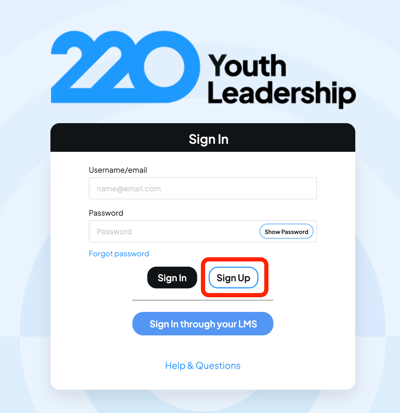
2. Click "Sign Up".
3. Enter this code into the "Access Code" field: [INSERT YOUR ACCESS CODE HERE]
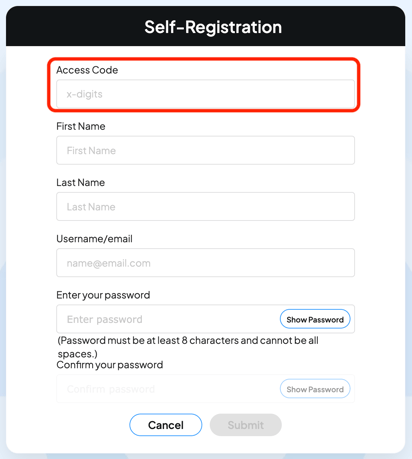
4. Enter the rest of your details (First and Last Name, username can be your email, and your password).
5. Save your password using a password manager if you can to avoid getting locked out.
Problems with your access code? Email support@220leadership.com.